Ad Intelligence API Guide: Build AI Workflows and Custom Dashboards With Adflex V2
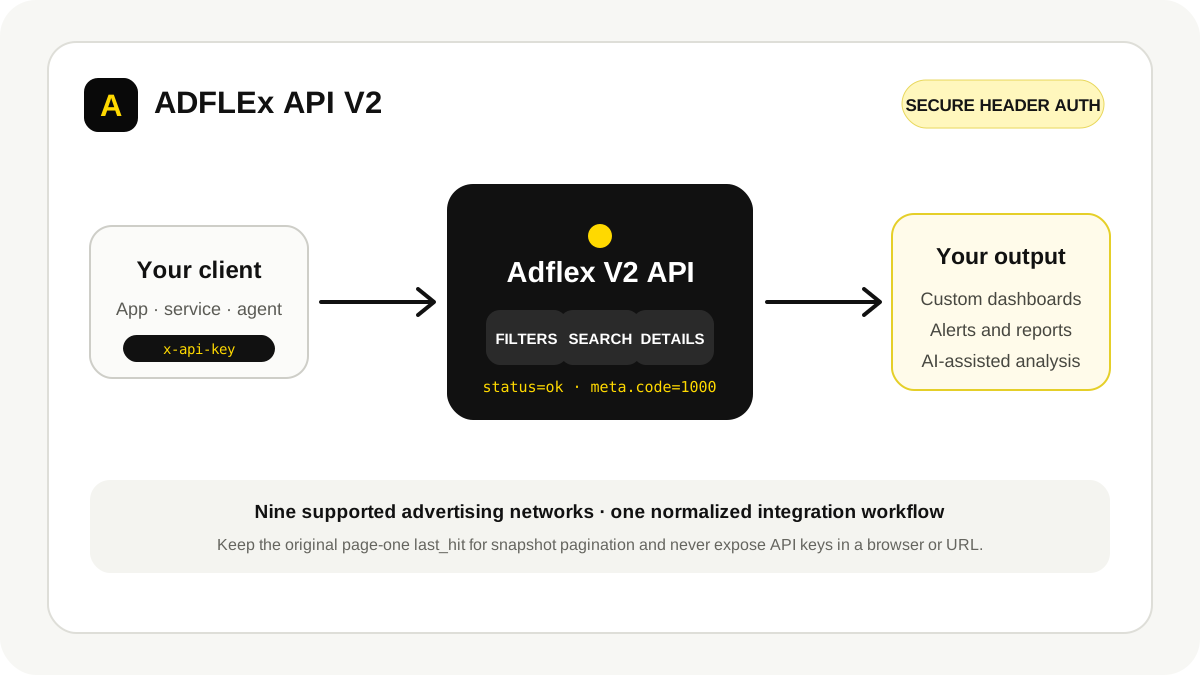
An ad intelligence API turns competitor-ad research into a repeatable data workflow. Instead of exporting screenshots by hand, a team can search ads, retrieve normalized details, build alerts, populate a custom dashboard, or add structured ad signals to an AI-assisted research process.
Adflex API V2 supports nine advertising networks and formalizes a consistent workflow around secure header authentication, filter discovery, platform search, snapshot pagination, and ad-detail requests. The important part is not making one successful request. It is designing an integration that remains secure, reproducible, and honest about what the data can prove.
Adflex API V2 basics
All requests use the base URL https://api.adflex.io/api/. V2 routes begin with /v2. The official V2 contract uses the x-api-key request header.
Keep the API key on your server. Do not place it in a URL, query string, client-side JavaScript bundle, analytics event, screenshot, or application log. If a browser needs Adflex data, call your own backend and let that backend call the Adflex API.
| Operation | V2 pattern | Purpose |
|---|---|---|
| Get filters | GET /v2/ads/{platform}/filters |
Discover the filters and component metadata supported by the platform. |
| Search ads | POST /v2/ads/{platform}/search |
Run a filtered, sorted search and retrieve normalized result cards. |
| Get ad details | GET /v2/ads/{platform}/{ad} |
Retrieve the platform-specific detail sections for one ad. |
The supported platforms are Facebook, Meta, Native, Display, Pinterest, Reddit, TikTok, X, and YouTube. Use the current Adflex API guide and V1-to-V2 migration guide as the contract; examples copied from older V1 documentation should not be treated as V2 routes.
A production-safe architecture
- Client: your dashboard, internal tool, scheduled job, or approved AI agent sends a request to your backend.
- Backend adapter: validates the user, applies rate and credit controls, attaches the Adflex key, and calls V2.
- Normalized storage: stores only fields needed for the use case, along with platform, ad ID, query version, and retrieval time.
- Application layer: powers dashboards, alerts, reports, classifications, or retrieval for an AI-assisted workflow.
- Observability: records request status, internal response code, latency, credits, retries, and redacted errors without logging credentials or unnecessary personal data.
Keep the Adflex adapter separate from your user interface and your internal data model. This makes V1-to-V2 migration, platform differences, testing, and future schema changes easier to control.
Example: retrieve current Meta filters
curl -X GET \
  'https://api.adflex.io/api/v2/ads/meta/filters' \
  -H 'x-api-key: YOUR_API_KEY'
Do not hard-code filter IDs from an old response forever. Fetch and cache the current filter metadata, then map your interface to the keys and component settings returned by V2.
Search, sorting, and snapshot pagination
V2 sorting uses an advanced_order object with both the field and direction. A search body can combine that object with the filters returned by the platform's filter endpoint.
{
  "page": 1,
  "advanced_order": {
    "orderby": "updated_at",
    "order": "desc"
  },
  "search_field": [
    { "type": "text", "text": "smart ring" }
  ]
}
Send the body to the relevant platform search route with Content-Type: application/json and the x-api-key header.
Preserve the first-page snapshot
V2 pagination is snapshot-based. Save the exact last_hit value returned on page one and reuse that same value for every later page while keeping filters and sorting unchanged. Do not replace it with a value from page two or generate a new timestamp for each request.
That rule matters when ads are continuously entering the index. A stable snapshot reduces missing, repeated, or reordered results while your integration walks through a result set.
Normalize what is common and preserve what is specific
Search cards provide normalized structures such as platform, statistics, and metadata. Detail responses can include platform-specific sections, and some sections may be absent. Model optional fields as optional; do not fill missing information with invented defaults.
Response checks, credits, and retries
An HTTP 200 response does not prove the operation succeeded. Adflex uses an application-level response envelope. Treat a request as successful only when both conditions are true:
-
statusequalsok. -
meta.codeequals1000.
if (response.status !== 'ok' || response.meta?.code !== 1000) {
  throw new Error('Adflex API operation failed');
}
Handle unknown non-1000 codes safely. Retry only connection errors, timeouts, or temporary server failures. Use bounded exponential backoff with jitter and stop after a small number of attempts. Do not retry validation, authentication, permission, credit-limit, or not-found failures automatically.
Filter discovery is free in the documented V2 credit model, while search and detail calls consume credits. Cache filter metadata responsibly, deduplicate work, cap concurrency, and include retry traffic in your usage estimate.
What to build with an ad intelligence API
Custom competitor dashboard
Combine Adflex ad data with your internal accounts, campaign notes, and review workflow. Useful dashboard views include new ads by competitor, creative-format changes, platform expansion, landing-page changes, and saved research sets.
Keep external estimates separate from your own verified performance data. Label retrieval time and source platform so users can understand what they are seeing.
Alerts and scheduled reports
Run bounded searches on a schedule, compare stable identifiers with the previous snapshot, and notify a team only when a meaningful condition changes. Examples include a new creative from a watched advertiser, a new platform used by a competitor, or a material change in offer language.
AI-assisted classification and research
Structured ad data can support controlled AI tasks such as classifying hooks, grouping creative themes, summarizing changes, retrieving examples for an analyst, or drafting a research brief. Keep a human in the loop for strategic conclusions.
Do not assume that API access grants unrestricted rights to train a model on every creative or landing page. Respect your agreement, intellectual property, privacy rules, platform terms, and applicable law. Minimize stored data, document provenance, and keep generated conclusions linked to the source records that support them.
Market and trend analysis
Track changes over time by platform, advertiser, domain, country, language, format, or call to action. Use an explicit methodology and do not label an ad “winning” solely because it has high engagement, long duration, or estimated impressions.
V1-to-V2 migration checklist
- Create a separate V2 client or adapter.
- Move authentication to the
x-api-keyheader. - Update every route to the V2 pattern.
- Fetch fresh V2 filter metadata.
- Convert saved sorting to
advanced_order. - Update normalized search-result and detail parsers.
- Preserve the first-page
last_hitduring pagination. - Check
statusandmeta.codefor every response. - Compare V1 and V2 on each platform you use, then cut over behind a rollback path.
Frequently asked questions
Can I call the Adflex API directly from a browser?
Do not expose the API key in client-side code. Route browser requests through your authenticated backend and attach the key there.
Does HTTP 200 mean the request succeeded?
No. Verify that status is ok and meta.code is 1000.
How should I paginate search results?
Save the exact last_hit returned on page one and reuse it for every later page while filters and sorting remain unchanged.
Can I use Adflex data in an AI workflow?
Structured ad data can support AI-assisted classification, retrieval, summarization, and research workflows. Your implementation must follow the applicable agreement, intellectual-property rules, privacy obligations, platform terms, and laws.
Where can I request API access?
Review the Adflex Enterprise API page and contact the team with your platforms, expected request volume, storage needs, and intended workflow.
Plan your V2 integration
Start with one platform and one measurable use case. Define the filters, output, retention rules, credit budget, error policy, and acceptance test before you scale. Read the current API guide, then request Enterprise API access when the architecture is ready.